Don't Host, Embed it!
In the last blog, we learned how to add video using the
<video> tag. But I also gave you a warning: Video files are heavy.
If you upload a 500MB video to your website:
- Your server might crash.
- Your hosting bill will be expensive.
- Your user's data will run out.
The Solution: Let the giants (YouTube, Vimeo) host the video. We will just open a "Window" on our website to show it.
This "Window" is called an Iframe.
1. What is an Iframe?
iframe stands for Inline Frame. Think of it as a picture frame, but instead of a photo, it holds an entirely different website inside it.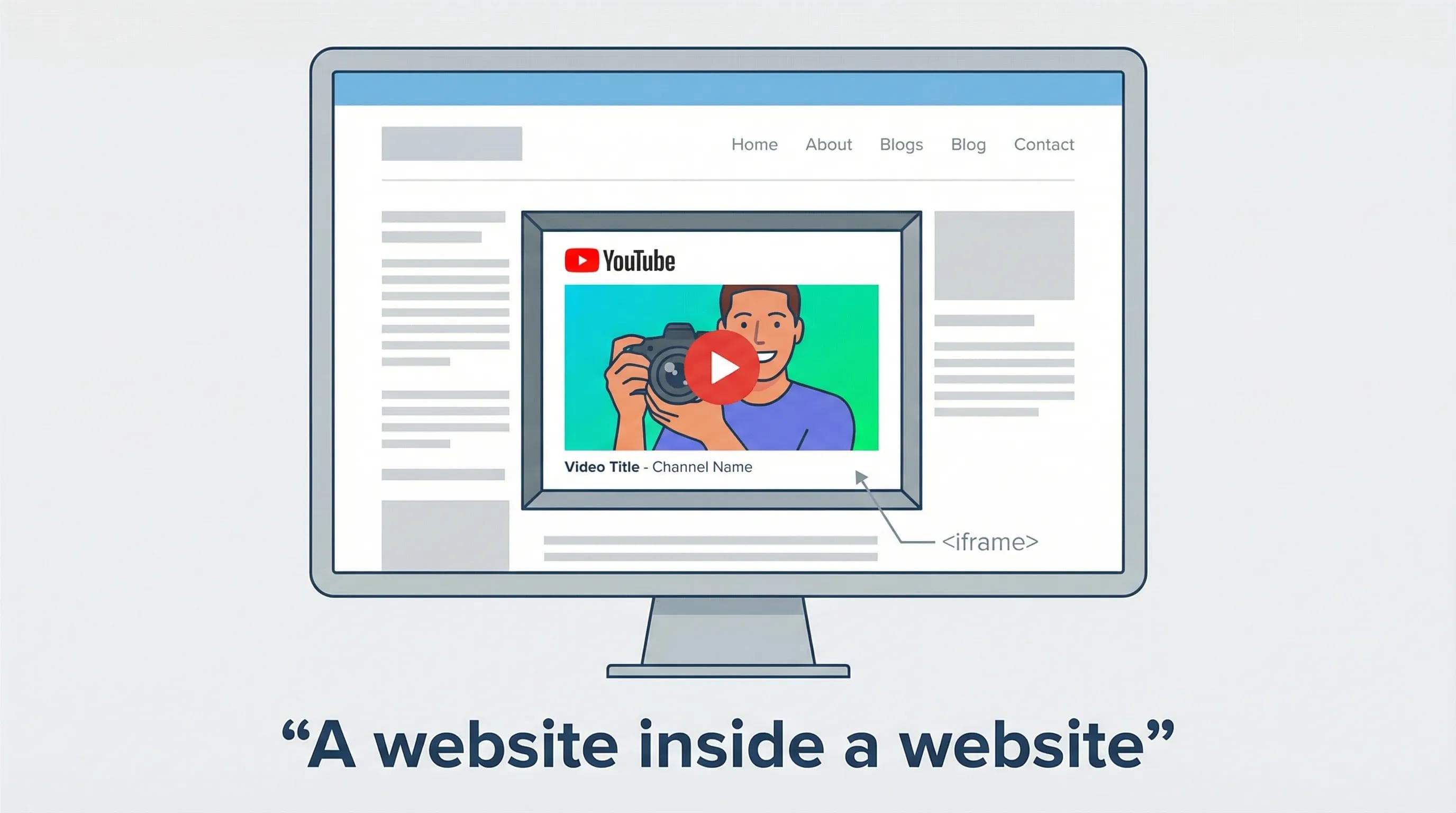
The Syntax:
html
<iframe src="https://www.wikipedia.org" width="500" height="300"></iframe>WARNING
You cannot embed every website. If you try src="https://google.com", it will fail (refuse to connect). Big sites block this for security reasons. You need a special Embed Link to make it work.
2. How to Embed YouTube Videos (The Right Way)
You do not need to write the code manually. YouTube writes it for you.
Step 1: Go to any YouTube video.
Step 2: Click the Share button.
Step 3: Click Embed (The
< > icon). Step 4: Copy the code provided.
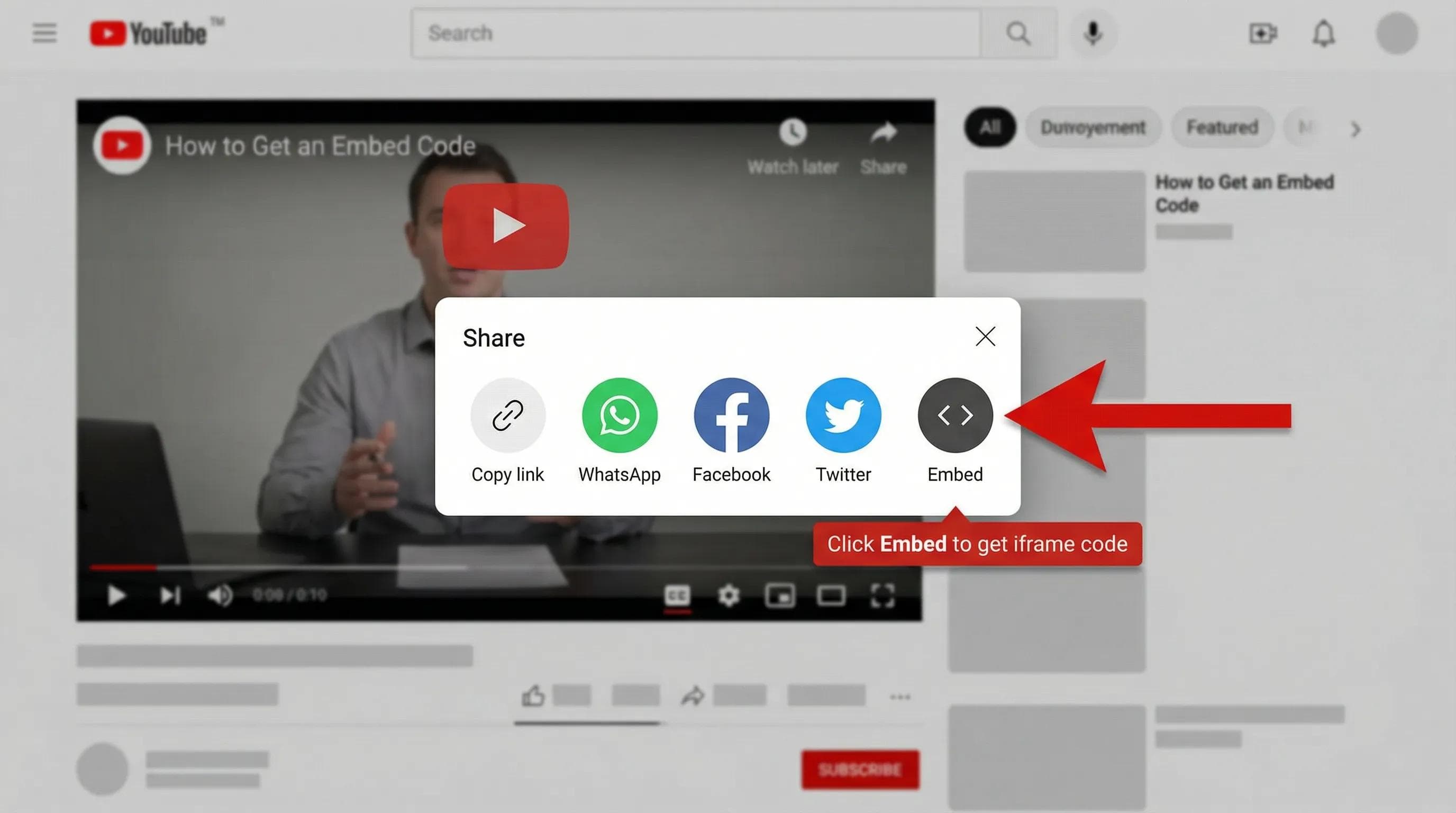
It will look something like this:
html
<iframe
    width="560"
    height="315"
    src="https://www.youtube.com/embed/dQw4w9WgXcQ"
    title="YouTube video player"
    frameborder="0"
    allow="accelerometer; autoplay; clipboard-write; encrypted-media; gyroscope; picture-in-picture"
    allowfullscreen>
</iframe>frameborder="0": Removes the ugly border around the video.allowfullscreen: Lets the user make the video full screen.
3. How to Embed Google Maps (For Contact Pages)
Every business website needs a "Find Us" section. Do not take a screenshot of a map. Make it interactive!
Step 1: Go to Google Maps and search for a location (e.g., "Eiffel Tower").
Step 2: Click the Share button.
Step 3: Click the tab "Embed a map".
Step 4: Copy HTML.
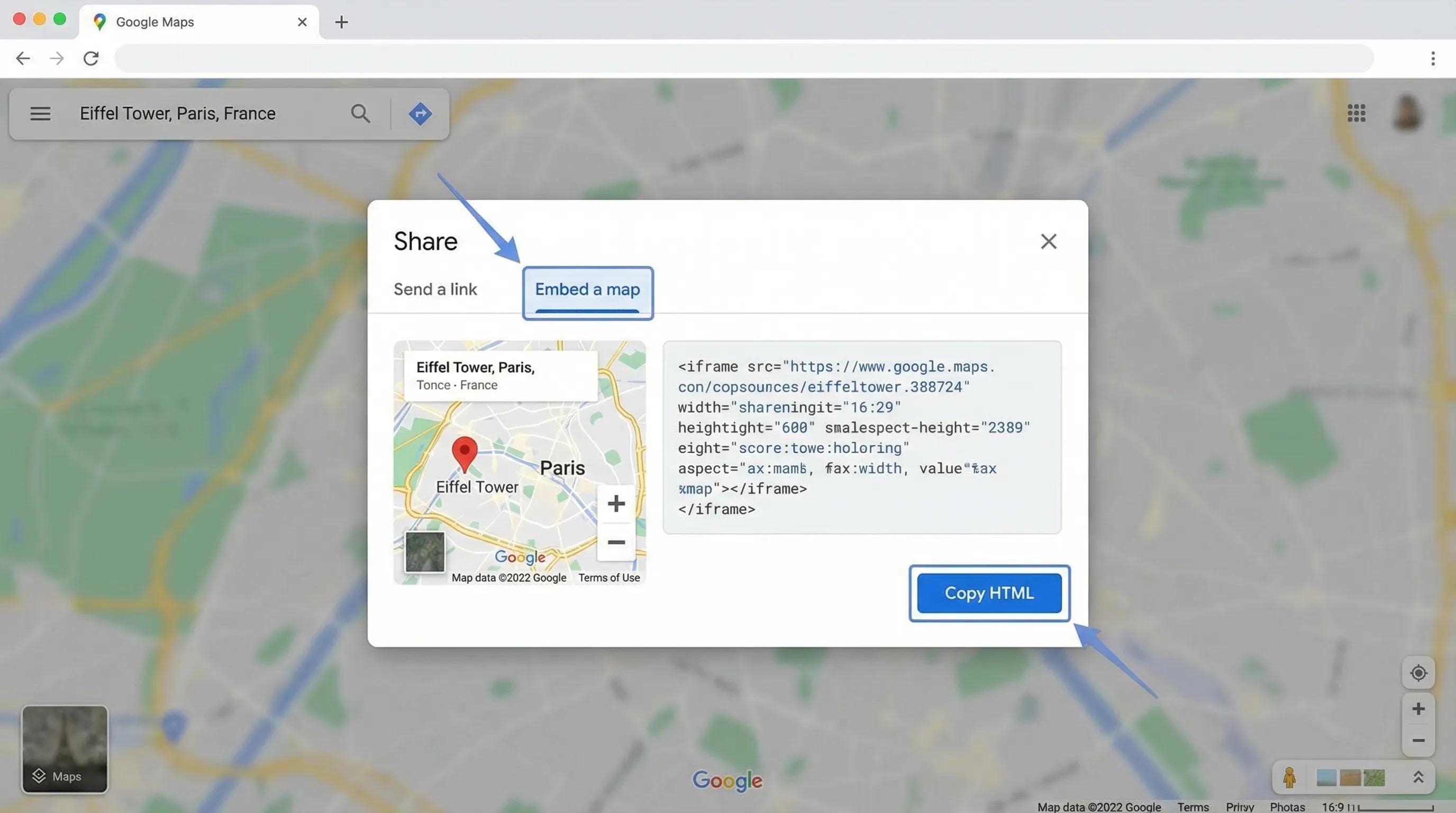
It creates a perfect, zoomable map for your users.
4. Pro Tip: Performance & Security
Iframes are "heavy." Loading a YouTube video + a Google Map can slow your site down by 2-3 seconds. That is huge.
The Magic Attribute: loading="lazy"
This tells the browser: "Don't load this heavy map until the user actually scrolls down to it."
INFO
Always add loading="lazy" to your iframes. It makes your site feel much faster on mobile phones.
html
<iframe src="..." loading="lazy"></iframe>Security: The sandbox Attribute
If you are embedding a website you don't fully trust, use
sandbox. It restricts what the embedded site can do (e.g., it stops them from running scripts or opening popups on your site).html
<iframe src="..." sandbox></iframe>The AI Angle: Relevance is Key
AI tools can generate iframe tags instantly. But AI doesn't understand Context.
- AI Mistake: It might embed a 1-hour documentary on your "Home Page."
- Human Wisdom: You know that a Home Page needs a short 30-second "Teaser."
AI writes the code; You decide the strategy.
Practical Task: The Ultimate Contact Page
Let's go back to our
contact.html (from Blog 11) and upgrade it.Step 1: Open
contact.html. Step 2: Add a "Find Us" section below the form.
Step 3: Use the code below (or get your own map link).
Step 4: Add sample intro (youtube embed)in the same file for testing!
🛑 STOP! DO NOT JUST COPY PASTE! The code you copy from Google/YouTube does NOT have theloading="lazy"attribute. Your Task: Copy the code, paste it, and MANUALLY addloading="lazy"to it.
html
<hr>

<h2>Find Us Here</h2>
<p>Visit our office at the center of the world (literally):</p>

<iframe
    src="https://www.google.com/maps/embed?pb=!1m18!1m12!1m3!1d2624.9916256937595!2d2.292292615509614!3d48.85837007928746!2m3!1f0!2f0!3f0!3m2!1i1024!2i768!4f13.1!3m3!1m2!1s0x47e66e2964e34e2d%3A0x8ddca9ee380ef7e0!2sEiffel%20Tower!5e0!3m2!1sen!2sin!4v1647855651234!5m2!1sen!2sin"
    width="100%"
    height="400"
    style="border:0;"
    allowfullscreen=""
    loading="lazy">
</iframe>

<br><br>

<h3>Watch Our Intro</h3>
<iframe
    width="100%"
    height="315"
    src="https://www.youtube.com/embed/tgbNymZ7vqY"
    title="Video"
    frameborder="0"
    allowfullscreen
    loading="lazy">
</iframe>

</body>
</html>
Step 4: Open Live Server.
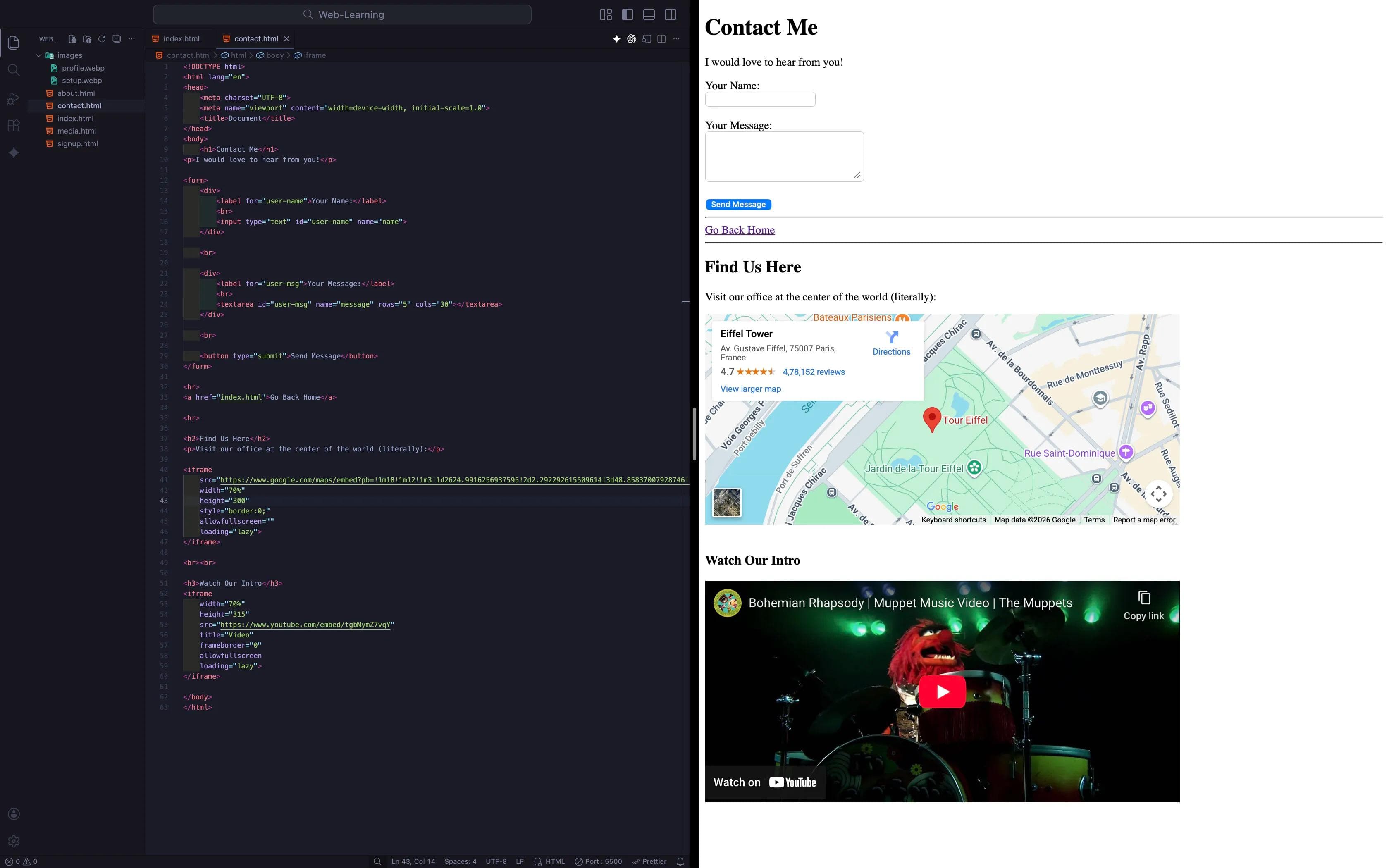
- Try dragging the map. It moves!
- Try playing the video. It plays!
Conclusion
Your website is now a multimedia hub. You have Forms, Videos, Audio, and Maps. It is functionally complete.
But... look at your code. Open your
index.html. It probably looks like a soup of <div> tags everywhere. <div> for the top part. <div> for the bottom part. <div> for the menu.The Problem: Google is confused. It doesn't know which
<div> is your Main Article and which <div> is just the Footer. If Google can't understand your page, it won't rank you high.In the next blog, "Semantic HTML," we will stop using
<div> for everything. We will learn the tags that Google loves: <header>, <nav>, <main>, <article>, and <footer>.See you in the next post!
You can Read next part from here - READ NOW!
HTML Series: Your First Step in Modern Web Development (2026)
Step 15 of 22